


 Topic Options
Copyright © 1998
Cadman Enterprises Ltd

Welcome to the Graham Slee Audio Products Owners Forum  Open to all owners plus those contemplating the purchase of a Graham Slee HiFi System Components audio product and wishing to use this forum's loaner program: join here (Rules on posting can be found here) This website along with trade marks Graham Slee and HiFi System Components are owned by Cadman Enterprises Ltd |
Bitzie: 24 bit or not? |
Post Reply 
|
Page 123 10> |
| Author | |
Graham Slee 
Admin Group 

Retired Joined: 11 Jan 2008 Location: South Yorkshire Status: Offline Points: 16314 |
 Post Options Post Options
 Thanks(0) Thanks(0)
 Quote Reply Quote Reply
 Topic: Bitzie: 24 bit or not? Topic: Bitzie: 24 bit or not?Posted: 04 Jul 2013 at 12:21am |
|
For those wanting "bit perfect" or "bit exact" playback via the Bitzie...
We keep getting asked if the Bitzie can actually receive at 24 bit? 1] Chip data sheet tells us it does. 2] Our own tests: we downloaded ASIO4ALL V2 into Foobar 2000. It was a pain to install onto my machine (Windows XP Professional), but easy on Leo's machine (Windows 7). Selecting ASIO: ASIO4ALL V2 on the preferences output menu plays the file as it is: 24 bit if 24 bit. 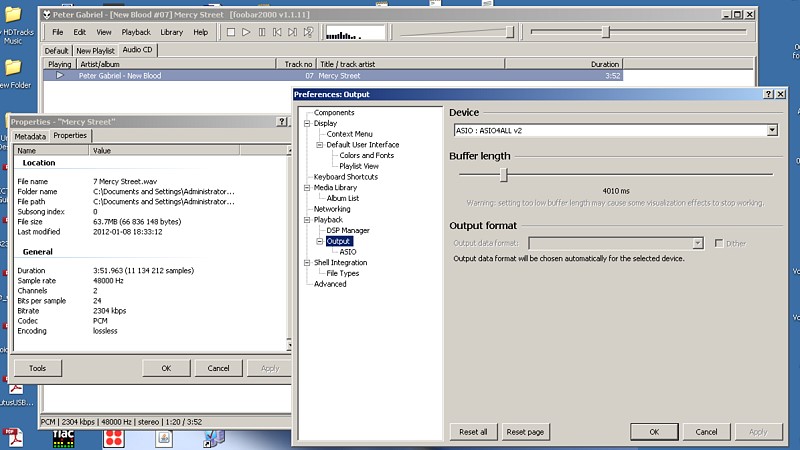 That's the point! It plays it as it is. And that's why if in this mode you ask it to play 96kHz, it won't - the Bitzie is 48kHz max. Because it refuses to play 96kHz that shows what's going to the Bitzie is "exact" - it plays up to 24/48 - it doesn't play 24/96 - it plays it "bit perfect/bit exact" as long as it's not over 48kHz. Right click the track being played, and click properties, it shows a dialogue box. Click the properties tab. You'll see the report and in the picture you'll see it is playing out at 24 bit. 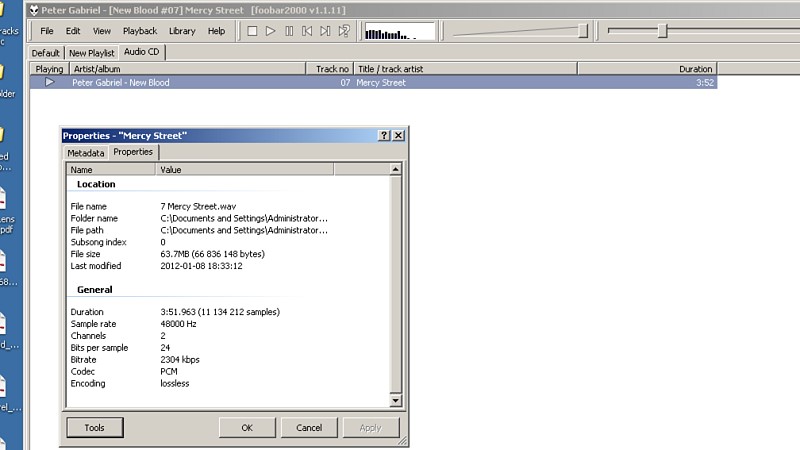 Here's a screen shot of the ASIO output drivers on my machine - the first one is for the sound card fitted to this machine. 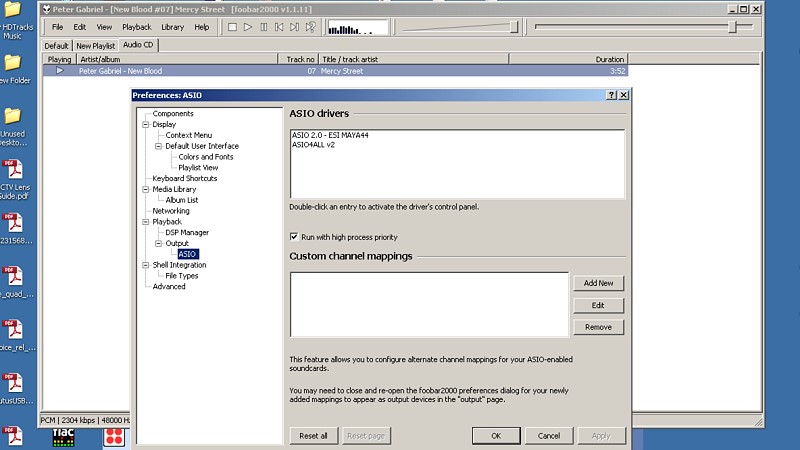 Whilst ASIO4ALL is selected its icon appears in the task bar - see green triangle in fourth picture and the ASIO display pane on clicking the icon.  Leo has said he will continue this topic with driver download information. If all this is too much just use the regular Foobar 2000 and let it decide. |
|
|
That none should be able to park up and enjoy the view without a smartphone and the knowledge in how to use apps
|
|
 |
|
|
Humboldt
Senior Member 

Joined: 15 Oct 2009 Location: Sweden Status: Offline Points: 251 |
Post Options
Thanks(0)
Quote Reply
Posted: 05 Jul 2013 at 11:24am |
|
With Windows Vista or Windows 7 (or 8 - which in my opinion is best to avoid) the ASIO4ALL procedure described above is not needed. There is an component in Windows Vista and Windows 7 called WASAPI which makes ASIO unnecessary. However, With Foobar you still have to install an plugin for WASAPI. It is found here: http://www.foobar2000.org/components/view/foo_out_wasapi
|
|
|
|
|
leo
Moderator Group 

Joined: 13 Jan 2008 Location: uk Status: Offline Points: 53 |
Post Options
Thanks(0)
Quote Reply
Posted: 07 Jul 2013 at 7:49pm |
|
I got the ASIO4ALL main driver from http://www.asio4all.com/
After installing that I got ASIO for foobar here http://www.foobar2000.org/components/view/foo_out_asio Details how to install it for Foobar here http://wiki.hydrogenaudio.org/index.php?title=Foobar2000:How_to_install_a_component Once installed simply do above post by Graham. I'll give WASAPI a try, thanks for the post Humboldt |
|
|
Is it classA ???
|
|
|
|
|
suede
Senior Member

Joined: 25 May 2011 Location: Sweden Status: Offline Points: 1202 |
Post Options
Thanks(0)
Quote Reply
Posted: 07 Jul 2013 at 8:38pm |
|
A great feature with WASAPI is it takes full control of the output meaning you're never bothered by annoying bleeps and sounds from other programs (or windows itself) mixing in. Maybe this feature is standard issue with all kernel streaming plugins now though.
|
|
|
|
|
gbr2004uk
Senior Member
Joined: 23 Jul 2009 Location: UK Status: Offline Points: 105 |
Post Options
Thanks(0)
Quote Reply
Posted: 28 Sep 2013 at 1:06pm |
|
I'm using the Bitzie (trial loan so far) with Foobar2000 set to "DS : Speakers(USB Audio CODEC)", but because I had earlier installed WASAPI, there's also WASAPI (two versions, one 'event', the other, 'push') each with Speakers USB CODEC.
I've not tried using either of the WASAPI settings yet -- I'm not clear as to whether they have any affect on the Bitzie. I've also been doing some homework and still reading here http://thewelltemperedcomputer.com/Intro/SQ/BitPerfectPlayback.htm on Bit-perfect playback. Thanks for any help on the WASAPI + USB CODEC question. all best Brian |
|
|
|
|
Humboldt
Senior Member
Joined: 15 Oct 2009 Location: Sweden Status: Offline Points: 251 |
Post Options
Thanks(0)
Quote Reply
Posted: 28 Sep 2013 at 8:17pm |
|
Brian. Use WASAPI. Potentially event style is to prefer, but I don't think it will make any difference with the Bitzie, but set it in event style anyway. Don' t use DS (Direct streaming) WASAPI is better.
Edited by Humboldt - 28 Sep 2013 at 8:18pm |
|
|
|
|
gbr2004uk
Senior Member
Joined: 23 Jul 2009 Location: UK Status: Offline Points: 105 |
Post Options
Thanks(0)
Quote Reply
Posted: 30 Sep 2013 at 5:10pm |
|
Thanks Humboldt. I was trying WASAPI last night comparing it with non WASAPI. I need to have another listen but first impression was that it gave a fuller (and slightly louder) sound over the headphones.
Brian
|
|
|
|
|
Post Reply
|
Page 123 10> |
 Tweet
Tweet
|
| Forum Jump | Forum Permissions You cannot post new topics in this forum You cannot reply to topics in this forum You cannot delete your posts in this forum You cannot edit your posts in this forum You cannot create polls in this forum You cannot vote in polls in this forum |
Forum Software by Web Wiz Forums® version 12.01
Copyright ©2001-2018 Web Wiz Ltd.
This page was generated in 0.079 seconds.
Copyright ©2001-2018 Web Wiz Ltd.
This page was generated in 0.079 seconds.